
Ship anything.Own everything.
A platform as a service that runs on your own box: git deploys, Compose stacks, databases, domains with TLS, backups and monitoring. One command, Apache-2.0.
curl -fsSL https://raw.githubusercontent.com/bablilayoub/nixploy/main/install.sh | sudo bash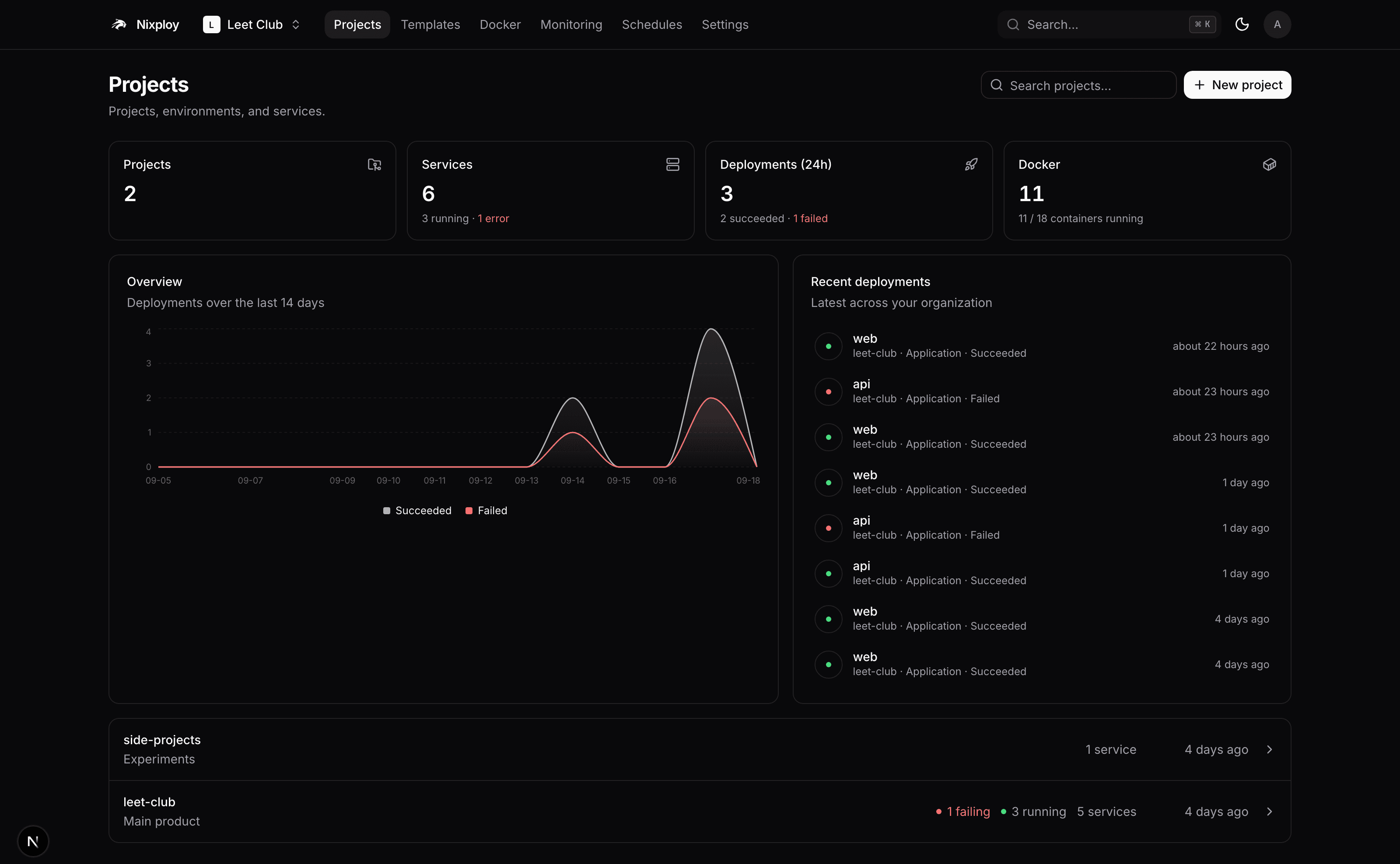
146
Templates
reviewed compose stacks
42
MCP tools
an agent gets your permissions
5
Database engines
each with backups and a restore
503
MiB control plane
panel, Postgres and Traefik, 20 Sep 2026
What it does
One box, the whole delivery loop
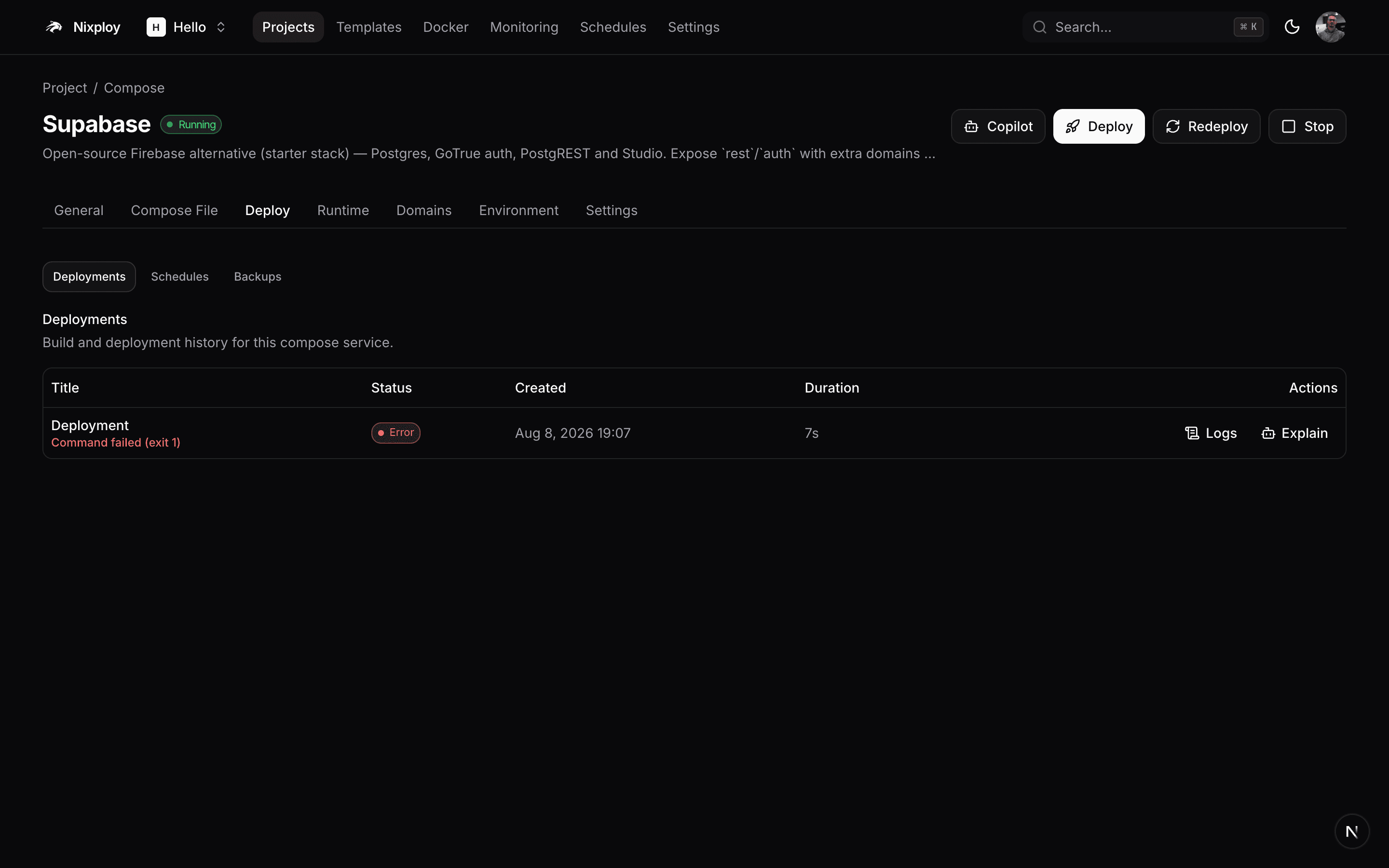
Deploy a commit, not a mood
GitHub, GitLab, Bitbucket and Gitea, built by nixpacks, railpack, a Dockerfile or buildpacks. Every deploy pins the image it ran.
146 one-click stacks
Reviewed compose files with pinned images and named volumes.

Domains and TLS
Traefik routes it and Let's Encrypt signs it. Link a DNS provider and the record is created for you.
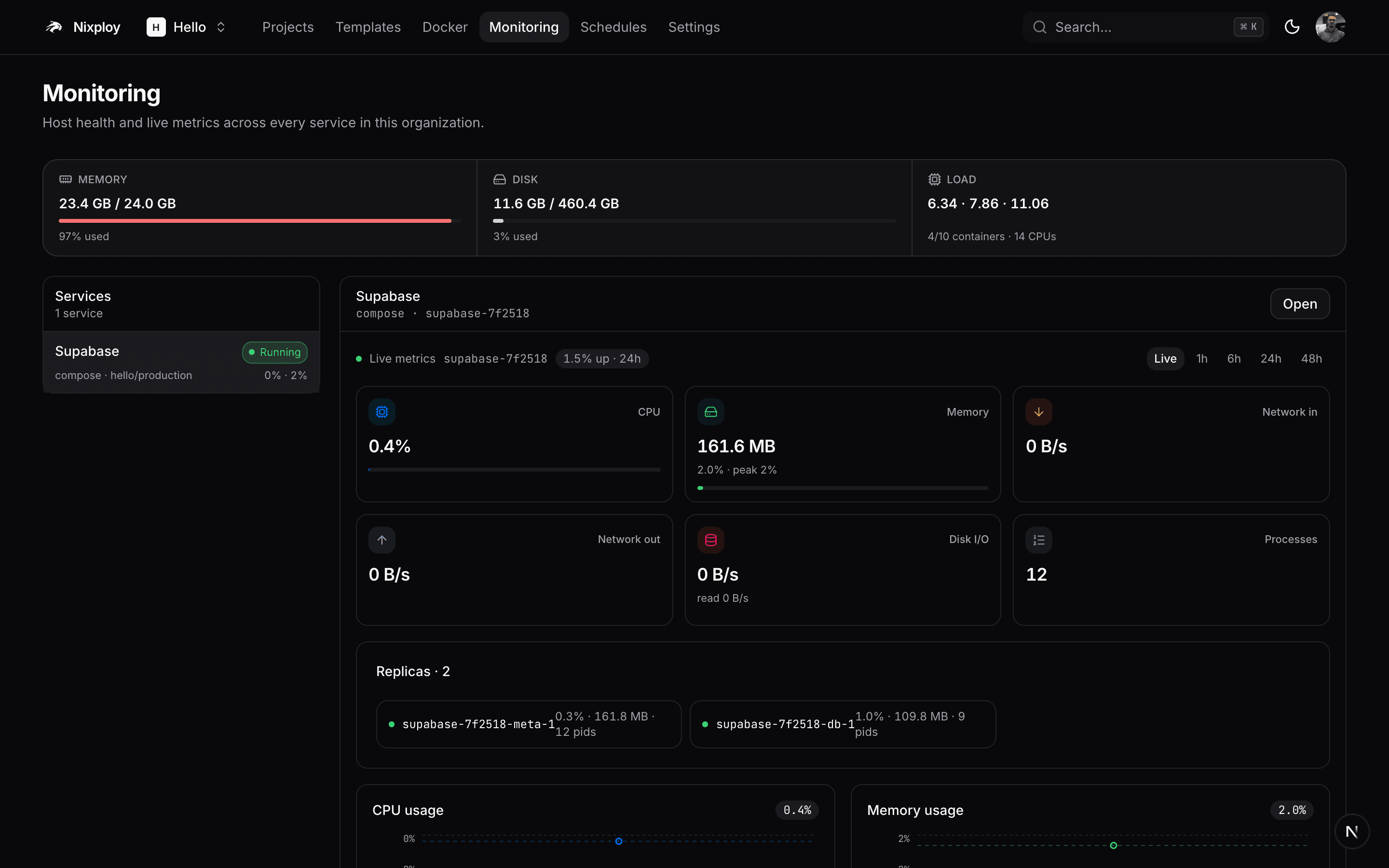
Runtime you can read
CPU, memory, network and disk per container, with logs kept after the container is gone.
$ nixploy app deploy api --ref v1.4.0 --wait
building dockerfile · linux/amd64
rollout 2/2 tasks running
done in 48s · https://api.acme.dev
The same surface from a terminal
Every procedure is a REST endpoint, a CLI verb and an MCP tool.
All of it
There is no enterprise tier
Single sign-on, teams, the audit log and whitelabelling are not a plan you move up to. They are in the same Apache-2.0 install as everything else, on the first server you put it on.
- Single sign-on
- OIDC and SAML providers configured in the panel, with group-to-role mapping.
- Teams and project scope
- Narrow a member to the projects their teams reach. A hidden project is not found.
- Per-member capabilities
- A catalog of capabilities on top of the role ladder, each checked on the server.
- Audit log with export
- Every mutation writes a row with the actor, the IP and the organization. CSV out.
- Whitelabel
- Your logo, name, accent and links, on the panel and on the login page.
- Login in front of any domain
- Put a staging host behind your own panel's sign-in, with your 2FA policy.
One click
146 stacks you do not have to write
Pinned images, named volumes, and only the variables the stack actually needs.
 n8nApps
Workflow automation for technical people — connect 400+ apps with code-level flexibility, self-hosted.
 OpenHoleDeveloper Tools
Self-hosted tunnel edge — gives any local port a public HTTPS URL with one command. This runs the server; the openhole CLI connects to it.
 SupabaseApps
Open-source Firebase alternative (starter stack) — Postgres, GoTrue auth, PostgREST and Studio. Expose rest/auth with extra domains for public API access.
 GhostCMS
Professional publishing platform — modern blogging, newsletters and memberships.
 GiteaProductivity
Lightweight self-hosted Git service — repositories, code review, issues, CI and package registry.
 NextcloudProductivity
Self-hosted productivity platform — file sync & share, calendars, contacts, office and more.
 VaultwardenProductivity
Lightweight Bitwarden-compatible password manager server written in Rust — use with official Bitwarden clients.
 GrafanaMonitoring
Open observability platform — query, visualize and alert on metrics, logs and traces from any data source.
 Uptime KumaMonitoring
Self-hosted monitoring tool like Uptime Robot — HTTP(s), TCP, ping, DNS and keyword monitors with status pages.
 OllamaAI
Run large language models locally — Llama, Mistral, Qwen and more behind a simple API.
 PlausibleAnalytics
Lightweight, privacy-friendly web analytics — a cookieless Google Analytics alternative (PostgreSQL + ClickHouse).
 ImmichApps
Self-hosted photo and video backup — a Google Photos alternative with mobile apps and ML search.
 MinIOApps
High-performance, S3-compatible object storage — buckets, versioning and IAM policies on your own hardware.
 MattermostApps
Open-source team collaboration — self-hosted Slack alternative with channels, playbooks and integrations.
 Cal.comApps
Open scheduling infrastructure — a self-hosted Calendly alternative for booking meetings.
 ChatwootApps
Open-source customer engagement suite — live chat, email and social inboxes in one dashboard.
 DirectusCMS
Open data platform — instant REST & GraphQL APIs and a no-code data studio on top of any SQL database.
 StrapiCMS
Open-source headless CMS — build content APIs (REST & GraphQL) with a customizable admin panel.
 PortainerProductivity
Container management UI — inspect and manage Docker/Swarm containers, images, networks and volumes. Requires instance admin (Docker socket).
 JellyfinMedia
Free software media system — stream movies, shows and music to any device with no strings attached.
 KeycloakSecurity
Open-source identity and access management — SSO, OIDC/SAML, social login and user federation.
 AuthentikSecurity
Identity provider focused on flexibility — SSO, MFA and enrollment flows for all your self-hosted apps.
 MeilisearchDeveloper Tools
Lightning-fast, typo-tolerant search engine with an instant search experience and simple REST API.
 ExcalidrawDeveloper Tools
Virtual whiteboard for sketching hand-drawn-like diagrams — fast, minimal, collaborative.
 MetabaseAnalytics
Business intelligence for everyone — ask questions about your data and build dashboards without SQL.
 Paperless-ngxKnowledge
Document management system — scan, OCR, index and archive your paperwork with full-text search.
 Pi-holeSecurity
Network-wide ad blocking via DNS sinkhole — dashboards, query logs and per-client policies.
 QdrantAI
Vector database for semantic search and RAG — filtered nearest-neighbour queries over embeddings, with a REST and gRPC API.
 WordPressCMS
The world's most popular CMS — blogs, sites and stores with thousands of themes and plugins.
 UmamiAnalytics
Simple, fast, privacy-focused website analytics — a self-hosted alternative to Google Analytics.
 OutlineKnowledge
Fast, collaborative knowledge base and wiki for teams — beautiful docs with Markdown, search and sharing.
 PrometheusMonitoring
Systems and service monitoring — a time-series database with a powerful query language (PromQL) and alerting.
 SyncthingStorage
Continuous file synchronization between devices — peer-to-peer, encrypted, no central cloud.
 Open WebUIAI
Feature-rich ChatGPT-style interface for local models — ships with an Ollama backend, supports RAG and tools.
 FlowiseAI
Drag-and-drop builder for LLM apps — chain prompts, tools, vector stores and agents visually.
 BaserowApps
Open-source Airtable alternative — spreadsheet-style databases with views, forms and a REST API for every table.
 HoppscotchDeveloper Tools
Open-source API development ecosystem — a fast Postman alternative for REST, GraphQL and WebSockets.
 FormbricksApps
Privacy-first survey and experience platform — in-app and link surveys, targeting, and results you own.
 NavidromeMedia
Modern music server and streamer — your personal Spotify, compatible with Subsonic/Airsonic clients.
 AudiobookshelfMedia
Self-hosted audiobook and podcast server — stream to the web or the dedicated mobile apps.
 ntfyNotifications
Simple HTTP-based pub-sub push notifications — send alerts to your phone or desktop with a single POST.
 GotifyNotifications
Self-hosted push notification server — send and receive real-time messages via a simple REST API and WebSockets.
 ListmonkNotifications
Self-hosted newsletter and mailing list manager — high-performance campaigns with a built-in analytics dashboard.
 Actual BudgetFinance
Local-first personal finance app — fast envelope budgeting with multi-device sync and bank import.
 Firefly IIIFinance
Self-hosted personal finance manager — track expenses, budgets, bills and assets with detailed reports.
 AdGuard HomeSecurity
Network-wide ad and tracker blocking DNS server — first-run setup wizard listens on port 3000.
 WireGuard EasySecurity
The easiest way to run WireGuard VPN — web UI for clients, QR codes and stats. Requires instance admin (NET_ADMIN / SYS_MODULE).
 Nginx Proxy ManagerSecurity
Manage reverse proxies and SSL certificates through a friendly UI. Publish ports 80/443 on the service when used as the edge proxy.
 code-serverProductivity
VS Code in the browser — run a full development environment on your server and code from anywhere.
Rent the box. Keep the rest.
One command, three services, and the first account is yours.